- Products
- Air Compressors & Air Tools
- Climate Control
- Compaction Equipment
- Concrete Cutting Tools & Equipment
- Concrete and Masonry
- Demolition & Excavation
- Electrical & Mechanical
- Fasteners and Anchoring Adhesives
- Floor Protection
- Generators and Welders
- Hand Tools
- Heaters
- Janitorial and Office Supplies
- Jobsite Protection
- Ladders & Storage
- Lighting & Lighting Accessories
- Man Lifts
- Material Handling Equipment
- Power Tools
- Pressure Washers & Pumps
- Safety Gear
- Safety Products
- Saws
- Surface Preparation
- SEASONAL PRODUCTS
- Rentals
- Air Compressor and Air Tool Rentals
- Climate Control Rental
- Compaction Rentals
- Concrete Equipment Rentals
- Demolition & Excavation Equipment Rentals
- Concrete Floor Grinder Rentals
- General Construction Equipment Rentals
- Generator Rentals and Welder Rentals
- Heater Rentals
- Light Tower Rentals
- Man Lift Rentals in Massachusetts and Rhode Island
- Material Handling Equipment Rentals
- Pressure Washer & Pump Rentals
- Saw Rentals in New England
- SEASONAL PRODUCTS
- Products
- Air Compressors & Air Tools
- Climate Control
- Compaction Equipment
- Concrete Cutting Tools & Equipment
- Demolition & Excavation
- Electrical & Mechanical
- Floor Protection
- Generators and Welders
- Construction Heaters
- Construction Ladders, Staging, & Storage
- Construction Lighting
- Man Lifts
- Material Handling Equipment
- Industrial Janitorial and Office Supplies
- Pressure Washers & Pumps
- Construction Safety Products
- Construction Safety Gear
- Surface Preparation
- Building Protection
- Diesel Accessories
- Zero Emissions
- Rentals
- Air Compressor and Air Tool Rentals
- Climate Control Rental
- Compaction Rentals
- Concrete Equipment Rental
- Demolition & Excavation Equipment Rental
- General Construction Equipment Rental
- Generator Rentals and Welder Rentals
- Construction Heaters Rental
- Light Tower Rentals
- Man Lift Rentals
- Material Handling Equipment Rental
- Pressure Washer & Pump Rentals
- Saw Rentals in New England
- Concrete Floor Grinder Rentals
- Zero Emissions Rentals
- Repairs & Used
- Parts
- Blog
- Services
- Resources
- About Us
- Contact Us
Sales & Rental of Construction | Industrial Equipment & Supplies


Why Choose a Touch Switch for Your Products?
A Touch Switch can make a product feel cleaner, quieter, and easier to use. A flat glass panel has no raised button to catch dust or interrupt a smooth surface. A light tap can control a lamp, appliance, or piece of equipment. The appeal is clear. So is the responsibility: the control must respond consistently, even with damp fingers or in a dim room.
Design thinker Don Norman has written, “Good design is actually a lot harder to notice than poor design.” His point applies well to touch controls. When a Touch Switch works as expected, people may barely notice it. When it misses a tap, gives weak feedback, or activates by accident, they notice immediately. The detail matters.
This outline explores why manufacturers choose touch technology, where it can improve a product, and what to check before selecting a switch. Topics include appearance, cleaning, response, durability, installation, and user feedback. A touch surface may reduce moving parts, but that does not guarantee a longer service life. Sensors, materials, and the surrounding environment still matter. Not every product needs a Touch Switch. Sometimes a physical button is easier to find, especially when users wear gloves or cannot look at the control. That trade-off deserves a real test, not just a polished product render.
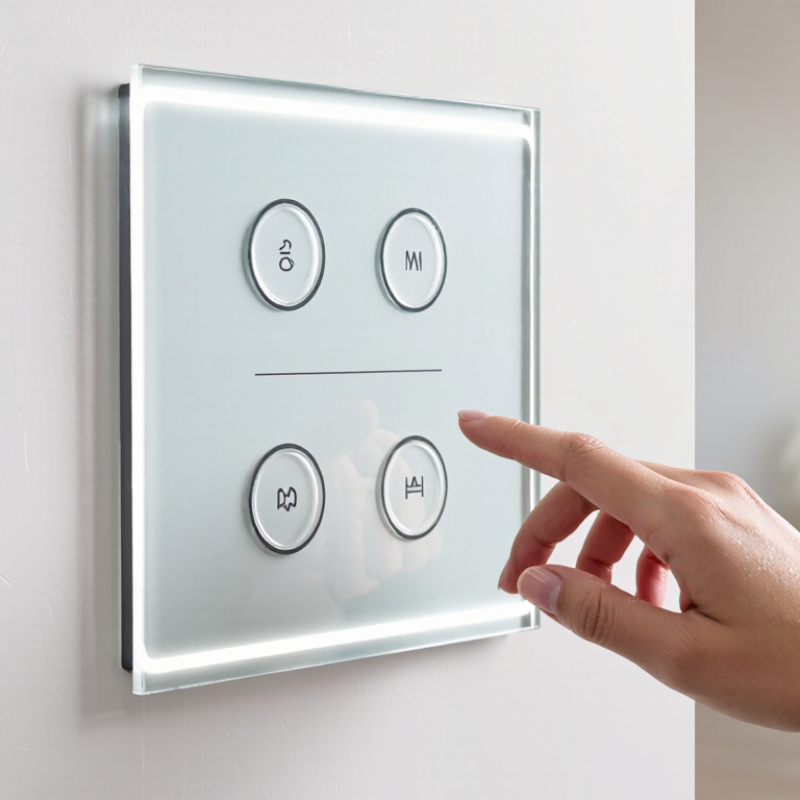
Table of Contents [Hide]
What Is a Touch Switch?
A touch switch is an electronic control that responds when a person touches a sensor surface. Unlike a mechanical switch, it may have no moving parts or visible button to press. The sensing area can sit beneath glass, plastic, or another suitable insulating panel. A light tap can turn a lamp on, adjust a setting, or activate a device.
Inside, the sensor detects a change in electrical capacitance when a finger approaches or touches the surface. A small control circuit interprets that change and sends a signal to the connected system. The response can feel immediate, though performance depends on sensor design, panel thickness, grounding, and nearby electrical noise. Wet fingers or gloves may affect detection. Small details matter.
For product designers, this means the switch can create a smooth, easy-to-clean surface and support compact layouts. It can also reduce wear caused by repeated mechanical movement. But touch control is not automatically better. A flat panel offers little physical feedback, which can make operation less certain in dim light or during movement. In real use, people may tap twice when one touch was enough. Testing the switch with the finished enclosure, not just a bare sensor, helps reveal these issues. Touch switches are best chosen when their clean appearance and simple interaction suit the product’s actual environment.

© Copyright - Pro Tool & Supply - Site by SVM E-Marketing Solutions - Sitemap
- Privacy policy