- Products
- Air Compressors & Air Tools
- Climate Control
- Compaction Equipment
- Concrete Cutting Tools & Equipment
- Concrete and Masonry
- Demolition & Excavation
- Electrical & Mechanical
- Fasteners and Anchoring Adhesives
- Floor Protection
- Generators and Welders
- Hand Tools
- Heaters
- Janitorial and Office Supplies
- Jobsite Protection
- Ladders & Storage
- Lighting & Lighting Accessories
- Man Lifts
- Material Handling Equipment
- Power Tools
- Pressure Washers & Pumps
- Safety Gear
- Safety Products
- Saws
- Surface Preparation
- SEASONAL PRODUCTS
- Rentals
- Air Compressor and Air Tool Rentals
- Climate Control Rental
- Compaction Rentals
- Concrete Equipment Rentals
- Demolition & Excavation Equipment Rentals
- Concrete Floor Grinder Rentals
- General Construction Equipment Rentals
- Generator Rentals and Welder Rentals
- Heater Rentals
- Light Tower Rentals
- Man Lift Rentals in Massachusetts and Rhode Island
- Material Handling Equipment Rentals
- Pressure Washer & Pump Rentals
- Saw Rentals in New England
- SEASONAL PRODUCTS
- Products
- Air Compressors & Air Tools
- Climate Control
- Compaction Equipment
- Concrete Cutting Tools & Equipment
- Demolition & Excavation
- Electrical & Mechanical
- Floor Protection
- Generators and Welders
- Construction Heaters
- Construction Ladders, Staging, & Storage
- Construction Lighting
- Man Lifts
- Material Handling Equipment
- Industrial Janitorial and Office Supplies
- Pressure Washers & Pumps
- Construction Safety Products
- Construction Safety Gear
- Surface Preparation
- Building Protection
- Diesel Accessories
- Zero Emissions
- Rentals
- Air Compressor and Air Tool Rentals
- Climate Control Rental
- Compaction Rentals
- Concrete Equipment Rental
- Demolition & Excavation Equipment Rental
- General Construction Equipment Rental
- Generator Rentals and Welder Rentals
- Construction Heaters Rental
- Light Tower Rentals
- Man Lift Rentals
- Material Handling Equipment Rental
- Pressure Washer & Pump Rentals
- Saw Rentals in New England
- Concrete Floor Grinder Rentals
- Zero Emissions Rentals
- Repairs & Used
- Parts
- Blog
- Services
- Resources
- About Us
- Contact Us
Sales & Rental of Construction | Industrial Equipment & Supplies


How to Choose TWS Wireless Earbuds for Your Business
Choosing Tws Wireless Earbuds for a business is not just a sound-quality decision. It affects calls, comfort, support costs, and the impression employees make in meetings. A tiny microphone can matter more than a premium bass profile. So can a charging case that survives a full day of travel.
The market is growing, but the numbers need context. Counterpoint Research reported that global TWS shipments rose 6% year over year in the second quarter of 2024. Bluetooth SIG’s 2024 Market Update projected annual Bluetooth device shipments could reach 7.5 billion by 2028. These figures signal a broadening wireless ecosystem, not a guarantee that every model will suit workplace use. Check compatibility, microphone performance in noisy rooms, battery life, warranty terms, and replacement availability before comparing prices.
Bluetooth SIG CEO Mark Powell has described Bluetooth as “the global standard for wireless connectivity.” For buyers, that makes reliable connection behavior a practical priority—not a substitute for testing. Try the earbuds on a real call. Walk past a laptop, enter a shared office, and listen for dropouts. Small tests reveal awkward details. A fit that works for one colleague may fail another; I would not treat a specification sheet as proof of comfort. This guide focuses on the checks that help businesses choose Tws Wireless Earbuds with clearer expectations and fewer avoidable surprises.
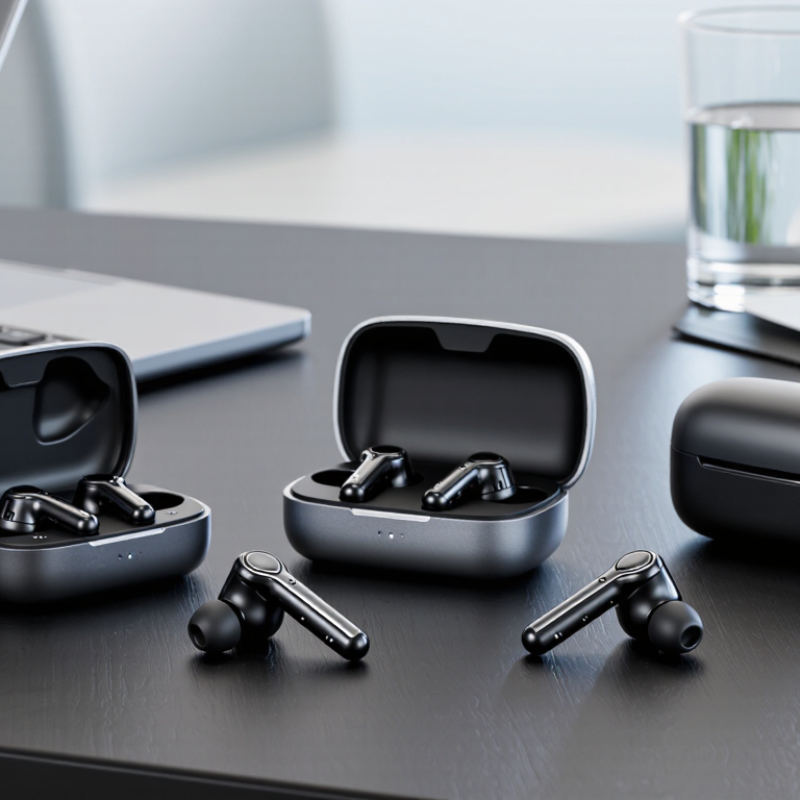
Table of Contents [Hide]
Define Business Use Cases and Employee Requirements
Define the work before choosing earbuds. A warehouse supervisor may need clear voice calls near machinery, while a finance analyst may need quiet focus and comfortable all-day wear. The 2023 Work Trend Index surveyed 31,000 people across 31 markets. It found 68% lacked enough uninterrupted focus time, and 64% struggled to find time and energy for work. These figures point to real needs, but they do not prove earbuds solve them.
Ask employees where and how they work: open offices, home desks, service counters, or frequent calls on the move. Then rank practical requirements. A reliable microphone matters for noisy rooms; a secure fit helps during long shifts; simple controls reduce fumbling between calls. Check battery life against actual shift length, and confirm compatibility with employees’ computers and phones. Small details matter.
Comfort is personal. Test several fit styles with a small group across different roles, and ask about pressure, call clarity, and fatigue after a few hours. Track support requests and return rates during the trial. A tidy spreadsheet will miss some discomfort. It may also reveal that one model cannot serve every team. Keep employee feedback anonymous where possible, and revise the requirements before placing a larger order.
© Copyright - Pro Tool & Supply - Site by SVM E-Marketing Solutions - Sitemap
- Privacy policy