- Products
- Air Compressors & Air Tools
- Climate Control
- Compaction Equipment
- Concrete Cutting Tools & Equipment
- Concrete and Masonry
- Demolition & Excavation
- Electrical & Mechanical
- Fasteners and Anchoring Adhesives
- Floor Protection
- Generators and Welders
- Hand Tools
- Heaters
- Janitorial and Office Supplies
- Jobsite Protection
- Ladders & Storage
- Lighting & Lighting Accessories
- Man Lifts
- Material Handling Equipment
- Power Tools
- Pressure Washers & Pumps
- Safety Gear
- Safety Products
- Saws
- Surface Preparation
- SEASONAL PRODUCTS
- Rentals
- Air Compressor and Air Tool Rentals
- Climate Control Rental
- Compaction Rentals
- Concrete Equipment Rentals
- Demolition & Excavation Equipment Rentals
- Concrete Floor Grinder Rentals
- General Construction Equipment Rentals
- Generator Rentals and Welder Rentals
- Heater Rentals
- Light Tower Rentals
- Man Lift Rentals in Massachusetts and Rhode Island
- Material Handling Equipment Rentals
- Pressure Washer & Pump Rentals
- Saw Rentals in New England
- SEASONAL PRODUCTS
- Products
- Air Compressors & Air Tools
- Climate Control
- Compaction Equipment
- Concrete Cutting Tools & Equipment
- Demolition & Excavation
- Electrical & Mechanical
- Floor Protection
- Generators and Welders
- Construction Heaters
- Construction Ladders, Staging, & Storage
- Construction Lighting
- Man Lifts
- Material Handling Equipment
- Industrial Janitorial and Office Supplies
- Pressure Washers & Pumps
- Construction Safety Products
- Construction Safety Gear
- Surface Preparation
- Building Protection
- Diesel Accessories
- Zero Emissions
- Rentals
- Air Compressor and Air Tool Rentals
- Climate Control Rental
- Compaction Rentals
- Concrete Equipment Rental
- Demolition & Excavation Equipment Rental
- General Construction Equipment Rental
- Generator Rentals and Welder Rentals
- Construction Heaters Rental
- Light Tower Rentals
- Man Lift Rentals
- Material Handling Equipment Rental
- Pressure Washer & Pump Rentals
- Saw Rentals in New England
- Concrete Floor Grinder Rentals
- Zero Emissions Rentals
- Repairs & Used
- Parts
- Blog
- Services
- Resources
- About Us
- Contact Us
Sales & Rental of Construction | Industrial Equipment & Supplies


How to Choose a Low Profile CPU Cooler?
Choosing a Low Profile CPU Cooler is not simply a matter of finding the shortest heatsink. It is a space, noise, and temperature decision. In a compact case, every millimeter matters. A cooler may fit beneath a 70 mm clearance limit yet still block memory, exhaust airflow, or a PCIe slot.
Industry research reflects this growing design pressure. Grand View Research identifies thermal management as an important factor in the expanding computer cooling market, while IDC’s small-form-factor PC analysis highlights demand for compact systems that deliver desktop-class performance. These reports do not guarantee that every Low Profile CPU Cooler will perform equally. They show why careful selection matters as processors become more power-dense.
Noctua product engineer Jakob Dellinger has described the challenge this way: “Low-profile cooling is always a compromise between available space, noise, and thermal performance.” That balance is easy to underestimate. A cooler with a dense fin stack may look impressive, but restricted airflow can turn it into a warm metal roof above the CPU. Fan speed, mounting pressure, case ventilation, and processor power limits all change the result.
Small details matter.
This guide will compare height, heat dissipation, socket compatibility, acoustic behavior, and real-world installation experience. It will also question a common assumption: the largest cooler is not always the best cooler. In a poorly ventilated mini-ITX case, a slightly weaker model with better airflow may produce steadier temperatures. Readers should verify manufacturer specifications, because case tolerances and motherboard layouts can differ by only a few millimeters.
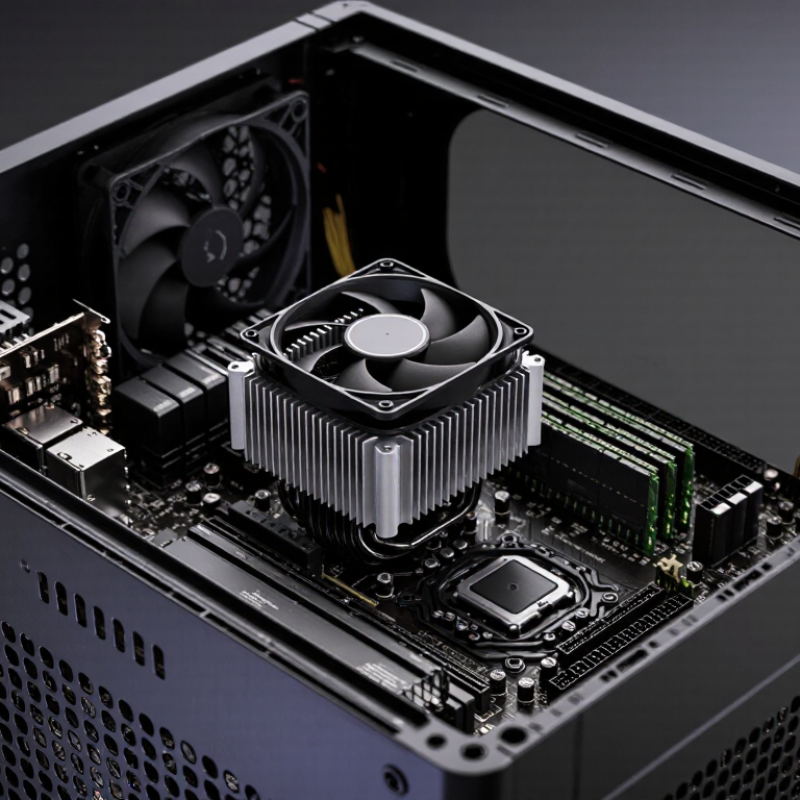
Table of Contents [Hide]
Define the Space, Performance, and Compatibility Requirements
How to Choose a Low Profile CPU Cooler?
Start by measuring the available space, not by guessing from product photos. Check your case’s maximum CPU cooler height and compare it with the cooler’s full dimensions. Include the fan, mounting clips, and any side-panel bulge. Measure twice. Clearance matters. Also inspect nearby memory slots, motherboard heatsinks, and the graphics card. A cooler may fit the socket but still block tall memory or restrict airflow.
Performance depends on more than the advertised thermal rating. A processor’s real power draw can exceed its basic specification during sustained rendering or gaming. Look for test results using similar workloads, room temperatures, and fan speeds. A low profile cooler with a larger fin stack often handles heat better, but it may produce more noise in a narrow case. Case airflow matters too. One intake fan and one exhaust fan can change temperatures noticeably.
Compatibility needs careful checking. Confirm the socket, mounting hardware, motherboard layout, and memory clearance before buying. Follow the installation manual, especially when applying thermal paste and tightening screws evenly.
I once trusted a height measurement and ignored the side panel, creating unnecessary pressure during installation. That was avoidable.
Leave room for maintenance, dust cleaning, and future component changes. Specifications help, but physical measurements and reliable independent testing reveal the practical limits.

© Copyright - Pro Tool & Supply - Site by SVM E-Marketing Solutions - Sitemap
- Privacy policy